AI photo restoration
Old Photo Restoration Online with AI
Restore old photos online with AI: repair scratches, reduce grain, improve clarity, and add natural color while keeping people and memories recognizable.
GrowUpAI turns a scanned or phone-captured print into a cleaner digital keepsake. It works well for family portraits, faded snapshots, and restoration experiments where you want to review the output before downloading.
See the output format
Old Photo Restoration Online with AI
Old Photo Restoration Online with AI · 1
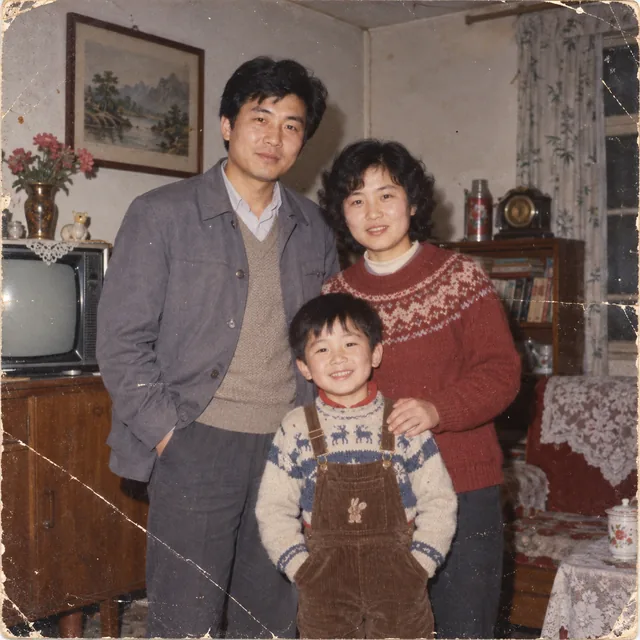
Old Photo Restoration Online with AI · 2
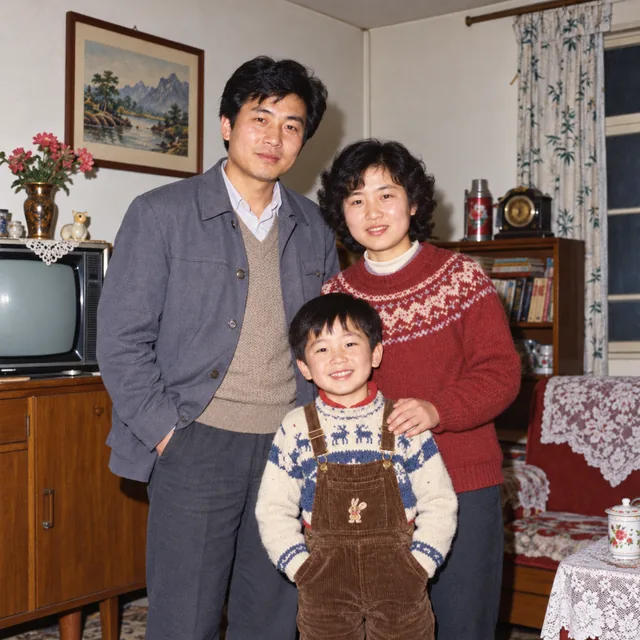
Old photo restoration FAQ
Direct answers about free online restoration, AI color, and image quality.
You can open this page and prepare a restoration preview without installing desktop software. Check the current tool state and service limits before starting a large batch.
Use the clearest scan or phone capture you have, with the full print visible and even lighting. A higher-resolution source gives the model more evidence for faces, edges, and clothing.
It can reduce visible scratches, dust, and small crease marks when nearby texture is available. Large missing sections may be reconstructed as a plausible interpretation rather than the original detail.
Yes, choose the color preset or describe a restrained natural color pass. Colorization is an estimate, so keep the original black-and-white scan.
The prompt asks the model to preserve people and facial identity, but generative repair can alter unclear details. Review the output and do not use it for identity verification.
The page accepts JPG, PNG, and WebP images up to 1 MB. Keep the original high-resolution file separately before creating a web-sized copy.